
Answering a question from Sarrai in the expert channel
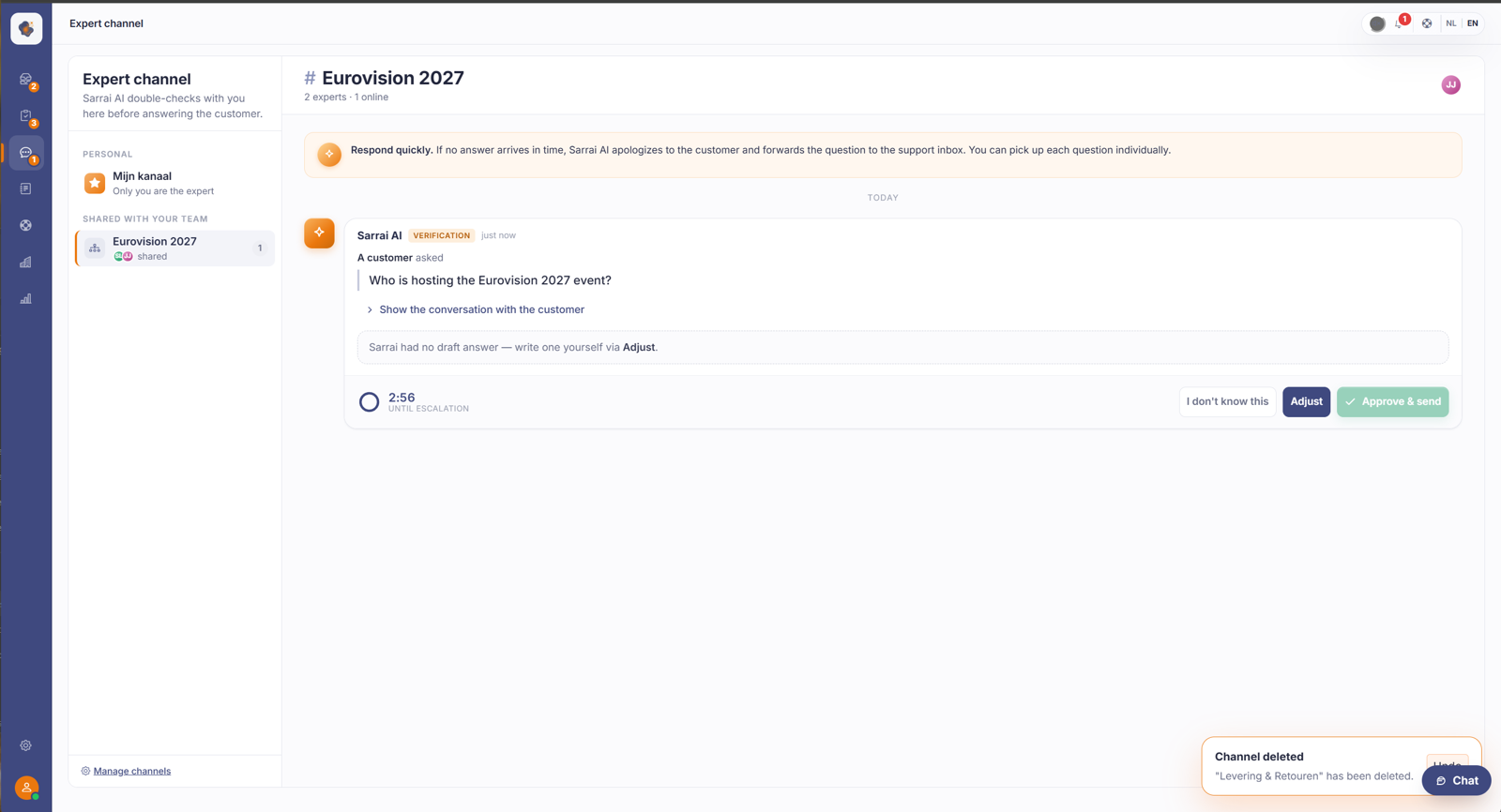
Open the Expert channel, pick up an open question and give your answer. Sarrai uses it to help the customer further. Respond quickly, otherwise she hands off to the support inbox.
Short answer: open the Expert channel on the left in the menu, pick an open question and type your answer. Sarrai uses your answer to help the customer further. Respond quickly: if no answer comes in time, she hands the question off to the support inbox.
Step by step
- Open the Expert channel from the menu on the left.
- On the left, choose the channel: My channel (questions that are only for you) or a shared team channel.
- If there's an open question, pick it up and give your answer. If there are no questions, you see All handled.
Your answer doesn't go to the customer word for word
This is the biggest surprise of the expert channel: what you type is not forwarded word for word. Sarrai rewrites it in her own voice and sends it as a normal answer, so to the customer it looks as if the AI knew it herself. The practical upshot: you can answer in shorthand or with internal terms; the rewrite turns it into a customer-friendly message. Just don't count on your exact wording coming through. The gist does, the form doesn't.
After you send, you still have a short Undo (around 15 seconds): it pulls the message back out of the customer's chat and withdraws the automatic knowledge base proposal. If the customer sends something new in the meantime, that option lapses.
You read and answer in your own language
If a customer chats in English or French, you don't have to switch along. Sarrai shows you the question in the language you use the back office in, Dutch or English, so you can always read it easily. You simply answer in your own language.
What the customer gets back follows the language of the conversation, not yours. Sarrai translates your answer into the customer's language and sends it on that way. If the customer speaks French, they get the answer in French, even though you read and typed in Dutch. The knowledge base proposal that follows takes on the conversation's language too.
One thing to know: on your side it's binary, you get the question in Dutch or English depending on your own UI language. Sarrai works out the customer's language from what the customer writes, not from the widget's language setting, so it can be a third language. The answer then follows the customer, not you.
If you do see a colleague's question untranslated, in the conversation language instead of your own, that's not a save error. The question is always stored in the conversation language, and the translation into your language is made on top of that. If that translation fails once (for example because the translation service is briefly unavailable), you simply see the question in its original language. Nothing is lost and you can answer straight away; usually it's fine again on the next question.
Good to know
The expert channel is where Sarrai double-checks with you before she answers the customer. So your answer doesn't just help this one customer, it often also becomes a proposal for the knowledge base, so Sarrai can answer the question herself next time.
Speed matters. If a question sits too long, Sarrai apologises to the customer and hands the question off to a human in the support inbox.
Also searched as
"Sarrai is asking me a question", "answer a question internally", "what is the expert channel", "answering before the AI helps the customer"
See also
Was this article helpful?
Your feedback helps us improve this article.
Thanks for your feedback!
