
Approving, editing or rejecting a proposal from the approval inbox
Open the Approval inbox, pick a proposal under Open, and approve it, reject it, or edit it first. Approved proposals become articles that Sarrai can then use herself
Short answer: open the Approval inbox, pick a proposal under Open, and click Approve, Reject or Edit. If you approve, Sarrai applies your decision right away. A new proposal becomes a snippet she can use immediately; a revision of a published article goes live at once.
Step by step
- Open the Approval inbox from the menu on the left. At the top there are three tabs: Open, Approved and Rejected.
- Under Open, click a proposal. In the middle you see the original conversation, the reason, and the proposed article. On the right is its destination (folder, visibility, language).
- Choose what to do with it:
- Approve, the proposal is applied to your knowledge base.
- Reject, the proposal moves to Rejected.
- Edit, you change the text first, then approve.
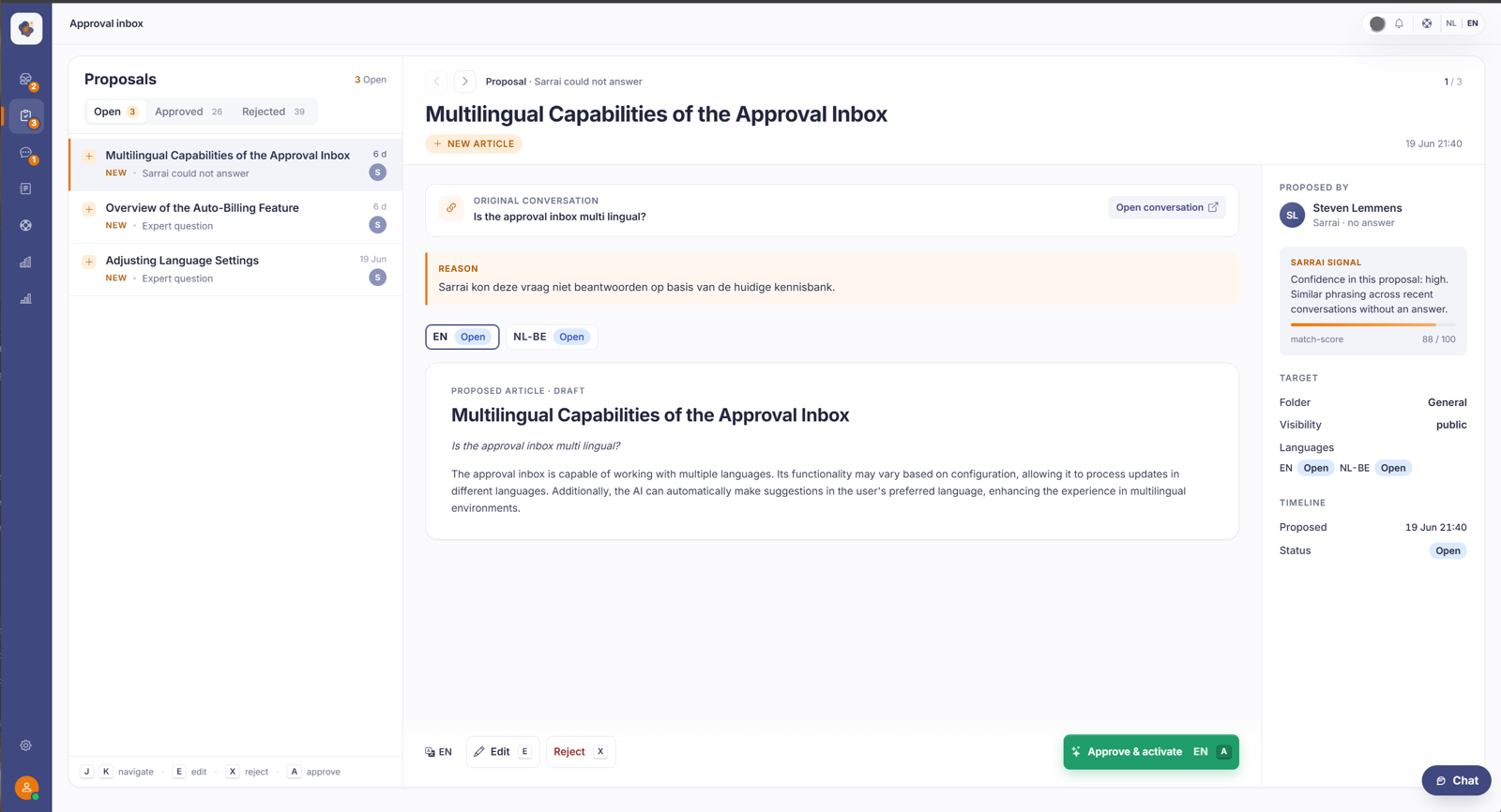
A proposal in more than one language
If more than one language is on in Help Center > Languages, a single proposal can hold several language versions at once. The opened proposal then shows language tabs (for example NL-BE and EN), each with its own status: Open, Approved or Rejected.
You handle each language separately. Click a language tab and you see the title and text in that language; the buttons at the bottom point to that language too (Approve and apply NL-BE). So you can approve the Dutch version already and leave the English one for now, or reject it. Every language you approve lands together in one bilingual article, so you don't create separate articles per language.
A multilingual proposal is only fully handled once you've handled every language. As long as one language is still Open, the proposal stays in your open list, even if you already approved the other language.
The language tabs only appear from the second language onward. If you maintain your knowledge base in one language, you simply see one version and nothing changes. Mind the difference too: the three tabs at the top of the inbox stay Open, Approved and Rejected. The language choice sits inside the opened proposal, not in that main filter.
Working faster with the keyboard
The approval inbox has shortcuts: J and K move through the list, A approves, X rejects and E edits. Handy when you want to work through a run of proposals in one go.
What happens the moment you approve
This is the most important thing to remember. Your approval is the human check, and Sarrai applies it herself from there. You don't have to go through your articles afterwards to work out what still needs publishing. What exactly happens depends on what you approve.
An approved new article comes in as a snippet. Sarrai may answer from it right away, but snippets are internal knowledge and don't appear on your public Help Center. If you do want a public page out of it, convert the snippet to an article and publish that.
An approved revision of a published article goes live immediately. Your approval creates a new version and moves the publication to it, so both Sarrai and your visitors see the new text at once. A new language version that arrives through a revision goes online the same way.
An approved revision of an article you hadn't published yet stays a draft. If you deliberately kept it offline, approving doesn't change that: the new version is ready in the editor and publishing stays your call.
One thing to watch in that second case. If the article still carried unpublished intermediate edits that someone saved in the editor without publishing, those go live along with your approval. So open a revision in the editor first if you suspect there's loose work sitting on it.
Good to know
Always read a proposal before you approve it: it becomes the source Sarrai answers customers from. If you're unsure about the wording or the destination, use Edit, but be aware that an edit is only saved when you approve. If you close the proposal without approving, your change is gone. Who's allowed to approve proposals depends on the roles and permissions your administrator has set.
Also searched as
"approve a knowledge base proposal", "accept a proposal from Sarrai", "decline a proposal", "edit a proposed article", "does approving publish it", "why isn't my approved proposal on the help center"
See also
Was this article helpful?
Your feedback helps us improve this article.
Thanks for your feedback!
