
Forwarding a conversation to a colleague or team
If you're no longer responsible for a conversation, you can reassign the conversation by forwarding it to a colleague or a team.
Short answer: at the top of the conversation, click Forward and pick a colleague or a team inbox (First Line or Second Line, for example). The recipient is notified that the conversation is with them.
Step by step
- Open the conversation you want to hand over.
- Click Forward at the top.
- From the list, pick the colleague (under Colleagues) or the team (under Teams) that takes it over.
- The conversation moves to that person or team inbox and the recipient gets a notification.
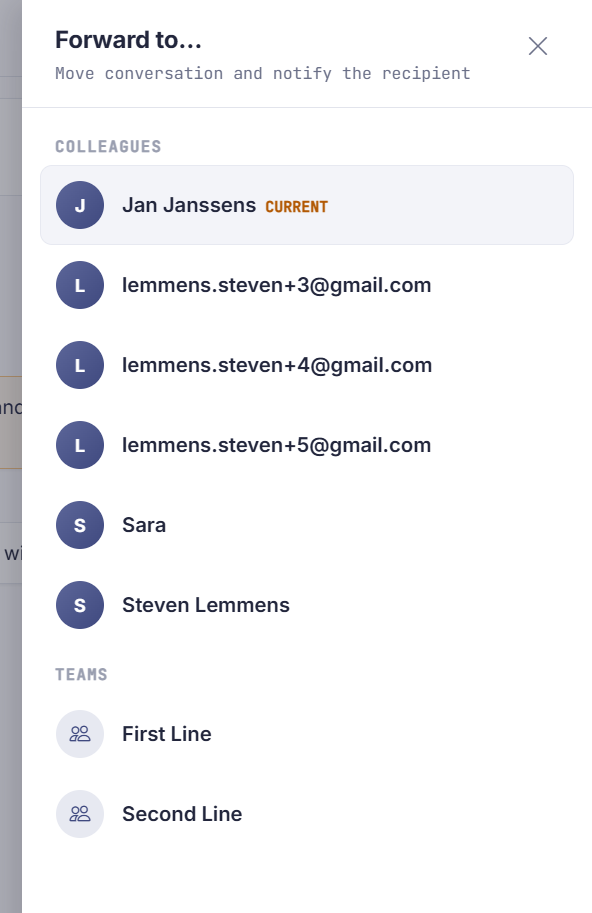
Taking a conversation over from Sarrai
Conversations that Sarrai is still handling herself, in the Sarrai mailbox, also have the Forward button. There, forwarding is immediately a takeover, and that has effects you can't see on the button.
The conversation escalates straight away. Sarrai stops answering, even though you haven't typed a word yet. It leaves the Sarrai mailbox and appears in the inbox of the person or team you picked; the timeline shows who took it over and who it went to.
Your visitor notices nothing until someone actually replies. So only forward a Sarrai conversation if follow-up is coming, because otherwise that person sits waiting while Sarrai could have helped them further.
It comes down to the same thing as sending a reply yourself in a Sarrai conversation, but without the message. Handy for putting a conversation straight with the right colleague. Pick nobody and nothing happens: there's nothing to take over then.
Good to know
Passing on context before you forward? Add an internal note first. Your colleague then sees right away what you've already tried, without having to plough through the whole conversation.
Sarrai uses the same logic herself: if the AI isn't sure of an answer, she forwards the conversation to the support inbox so a person can pick it up.
Two things to align on with your team. Forwarding overwrites an existing assignment without warning, so you can "pull" a conversation away from a colleague. And only the new recipient gets a notification; whoever loses the conversation isn't told. If you forward to a team rather than a person, no team member gets a personal ping.
Also searched as
"escalate a chat to second line", "hand a conversation over to a colleague", "route a question to a team", "handover of a conversation", "take a conversation over from the AI", "pull a chat away from Sarrai"
See also
Was this article helpful?
Your feedback helps us improve this article.
Thanks for your feedback!
