
Helpdesk reports: escalations and efficiency of your helpdesk
By using the reports about your helpdesk, you get more information about how many conversations escalated and how quickly they were eventually resolved.
Short answer: there are two reports under Helpdesk. Inbox escalations shows how many conversations went to a human and how quickly they got resolved. Helpdesk efficiency compares the performance of your agents.
The two reports
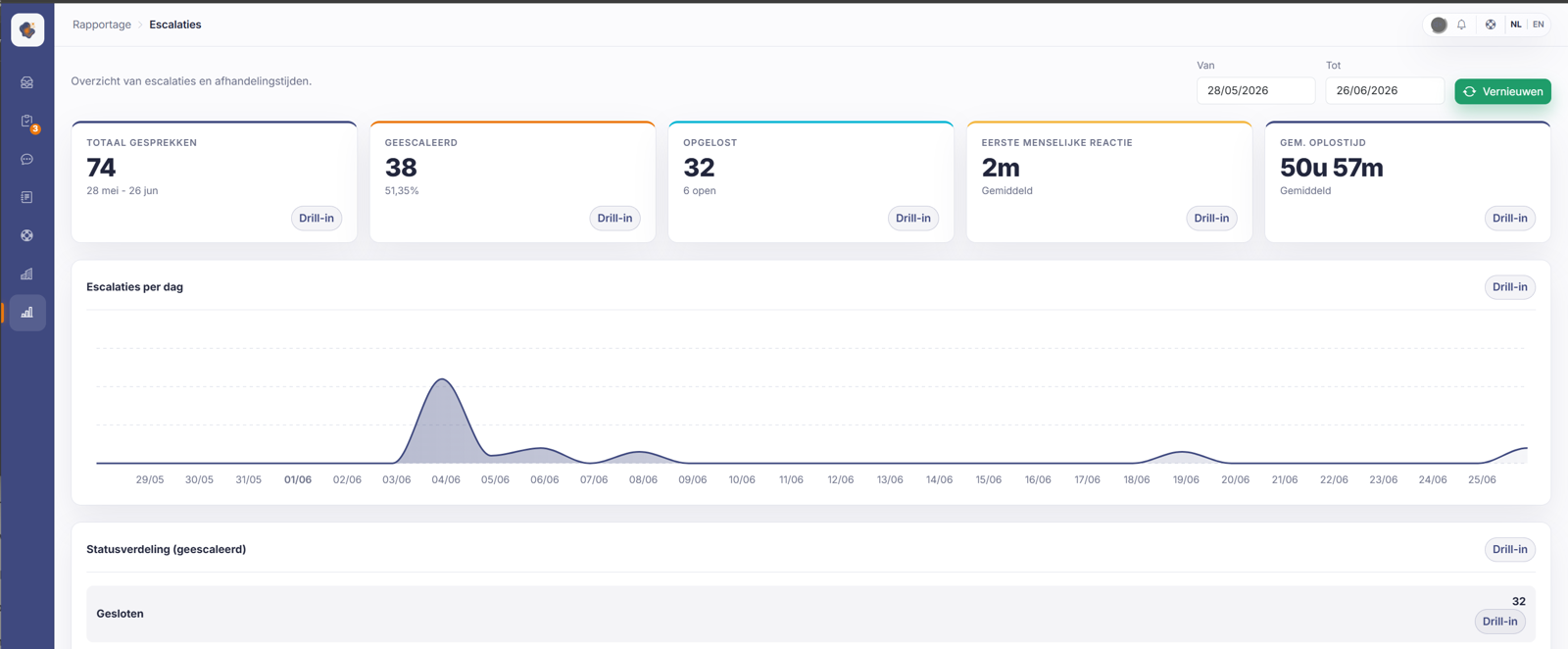
Inbox escalations gives you the number of escalations, the wait times, and the resolution times of conversations in the inbox. Among other things you see the total number of conversations, how many were escalated (and what percentage), how many were resolved, the time to the first human reply, and the average resolution time, along with a chart of escalations per day.
Helpdesk efficiency compares the workload per agent, the first response, the time to close, and the handling ratio. Useful for seeing how the work is spread out and where it gets stuck.
Good to know
A high escalation percentage isn't necessarily bad. It shows where Sarrai can't answer on its own yet, and so where new knowledge base content pays off the most. Tie these figures to the approval inbox: every approved suggestion lowers escalations over time.
Watch a few definitions when you read this. "Resolved" means "closed right now", so if you reopen a conversation it counts as open again. The measured response and resolution times start from the moment of escalation, not from the start of the conversation. The time Sarrai spent on it before the escalation doesn't count. And the "first human reply" ignores internal notes: only a real answer to the customer stops that clock.
Also searched as
"how many conversations escalate", "average resolution time", "how fast does my team respond", "workload per agent"
See also
Was this article helpful?
Your feedback helps us improve this article.
Thanks for your feedback!
