
Which languages do you maintain your knowledge base in?
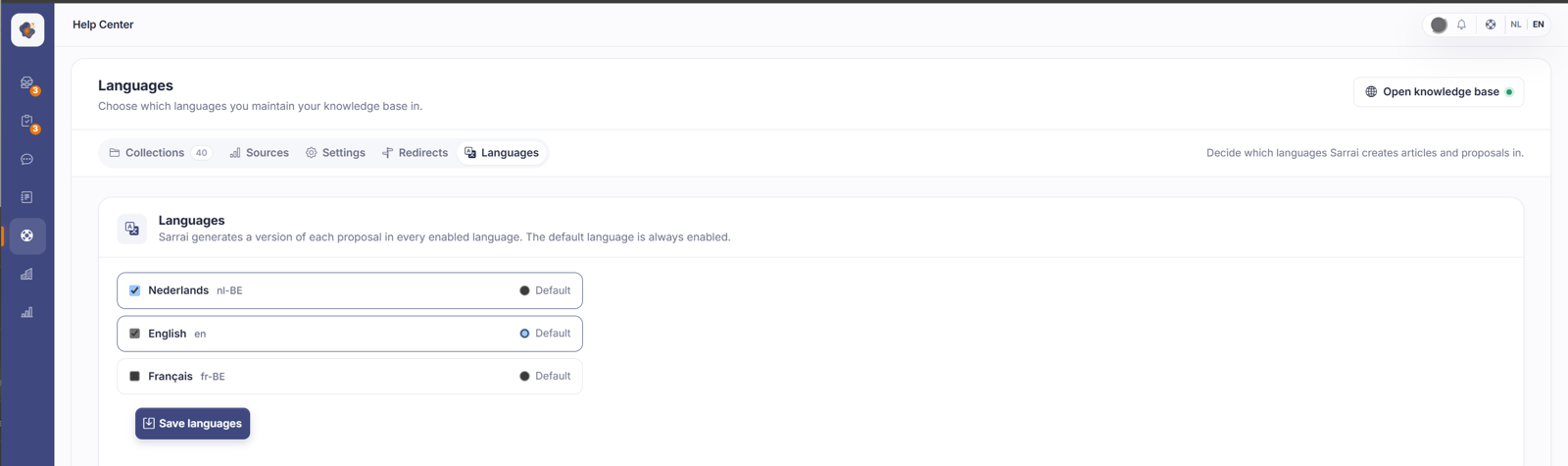
Under Help Center > Languages you choose which languages you maintain your knowledge base in and which one is the default. Sarrai creates a version of each proposal for every enabled language; the default language decides where a visitor without a language in the URL lands.
Short answer: open Help Center > Languages. Tick the languages you want to maintain your knowledge base in and mark your main one with Default. Sarrai creates a version of each proposal in the approval inbox for every enabled language, and your default language is always enabled.
Step by step
- Open Help Center and go to the Languages tab.
- Tick the languages you want to maintain (for example Dutch and English).
- Set Default on one language to make it your main language. You can't untick that one.
- Click Save languages.
Why this choice matters
Which languages are on here decides two things at once.
First your content: for every enabled language, Sarrai creates a separate version of a proposal in the approval inbox. With only Dutch on, you get one version per proposal. Turn English on as well and every proposal comes in with both a Dutch and an English version, each approved separately.
Second your default language. If someone reaches your public Help Center without a language in the URL, for example through your bare domain or a link without a language prefix, Sarrai automatically sends them on to the version in your default language. Set your default to English and such a visitor lands on the English version, not the Dutch one.
Good to know
The default language is set per workspace, so it follows your choice and isn't fixed to Dutch. If you change it, where prefix-less visitors land shifts along with it. This only affects the public side of your Help Center; the chat widget and the embed keep working.
Do make sure your default language is one you actually maintain. If a visitor arrives through a bare URL, Sarrai sends them to your default language, but your public Help Center is strict per language. If there's no published article in that language yet, such a visitor still lands on a 404. So set your default language to the language you really publish your content in.
Mind the difference with the language switcher in the article editor: here you choose which languages your whole knowledge base is maintained in, there you write the actual translation per article. So turning a language on doesn't mean all your articles instantly exist in that language. You still fill in the translations per article yourself.
Also searched as
"add a language to my knowledge base", "change the default language of the help center", "bare url lands on the wrong language", "turn on proposals in multiple languages", "set english as the main language"
See also
Was this article helpful?
Your feedback helps us improve this article.
Thanks for your feedback!
