
Which content can the AI use ?
By using the 'Sources' tab in your help center, you can quickly see what sources are available to the AI agent and which are not.
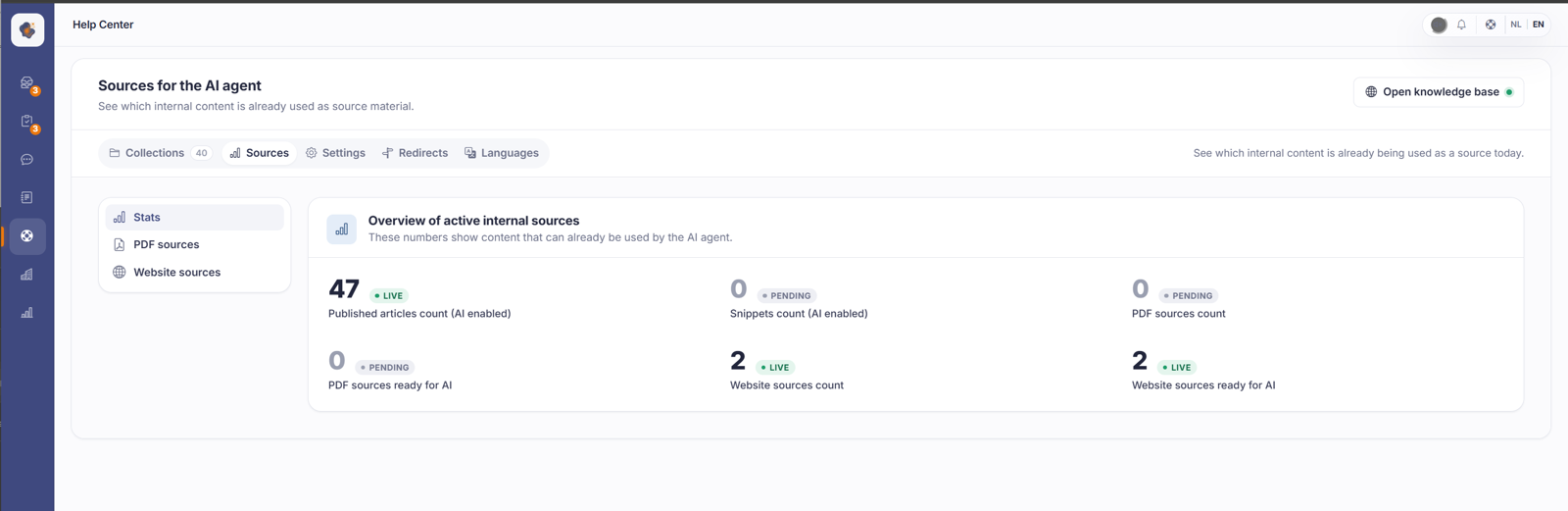
Short answer: open Help Center > Sources. There you see, in one overview, which internal content Sarrai uses as a source today: the number of published articles, snippets, PDF sources, and website sources, with their status.
What you see
The Stats tab shows, per type, how much content is ready for the AI: articles, snippets, PDF sources, and website sources. A live label means the content actively counts as a source. Waiting means something is still being prepared.
Under PDF sources and Website sources you manage those specific sources, handy if, besides your own articles, you also want Sarrai to use a document or an external web page.
A website source refreshes itself
A website you add as a source is crawled, and from then on re-read automatically every seven days. If something changes on your site, your source follows along. You don't have to remove it and add it again.
Do count on those seven days though. Publish something important on your website and it won't be in Sarrai's answers the same day. When she cites a page, that's the version from the last crawl, and the page may have changed or disappeared since.
Two things you can't see on screen. Refreshing leaves no gap: the content is replaced page by page, so there's no moment where Sarrai knows nothing about that source. And a crawl you paused yourself is left alone by the automatic refresh. Pause one and forget about it, and it stays paused until you start it again.
A crawled website can also be turned into real help center articles, by the way. See Generating articles from a website source.
On the free plan that automatic refresh falls away. Your existing sources stay searchable, they just quietly go stale. See How does Sarrai's pricing work?
A large crawl counts while it's still running
A source doesn't have to be fully read in before Sarrai gets something out of it. She uses sources with status ready as well as sources still processing, and decides per piece of content whether it can be queried.
That has an effect which looks confusing: during a large crawl, Sarrai's answers grow. Ask the same question an hour later and you may get a fuller answer. That's the point, so you don't have to wait for a crawl of several hours to finish before your source is worth anything.
Good to know
This overview is your control point: if you want to know exactly what Sarrai draws on, you look here. Whether an individual article counts is decided by the Available for AI Agent toggle in the editor.
A few more things to keep in mind. You can't turn a source off wholesale for the AI: removing it is the way to stop Sarrai using it everywhere. There's one exception, and it sits elsewhere: per website embed you can choose which sources that one chat may consult, while the source stays active everywhere else. Beyond that, a website source is cited in an answer with a clickable link and a PDF source has no clickable link. Cloud sources (beta) aren't used in answers for now: only articles, snippets, PDFs, and websites count.
Also searched as
"where the AI gets its answers", "how many articles the chatbot uses", "add pdf as a source", "website as a knowledge source", "which content is live for the AI", "does my website get crawled again", "how often does a source refresh", "my source is still processing"
See also
Was this article helpful?
Your feedback helps us improve this article.
Thanks for your feedback!
