
Managing your profile and account
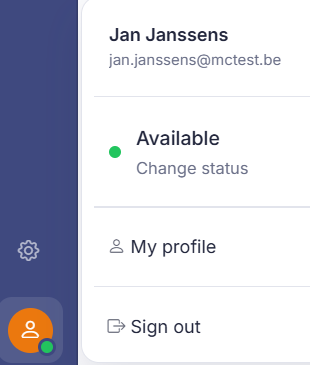
To manage your profile, click your avatar at the bottom left.
Short answer: click your avatar at the bottom left. In the menu that opens you'll see your name and email address, you change your status, you open My profile, and you choose Sign out to log out.
What's in the menu
At the top are your name and email address, with your current status and Change status. Below that you'll find My profile for your personal details, and Sign out to log out.
The Security block
At the bottom of My profile there's a Security block with the status of your two-step verification and a button to set it up or manage it. The block is green when it's on and orange when it's off, because we recommend it.
Setting it up happens on a separate page, and you come back here afterwards. See Turning on two-step verification for the setup and for what it brings with it, from the recovery codes you only see once to the second step that also follows a sign-in link.
Good to know
Two things worth keeping in mind. Your email address is also your login: change it here and your login name changes with it, without a confirmation email. And your profile photo is automatically shrunk to a small, square icon. The original image isn't kept, and there's no "remove photo" button.
You don't change your password here, but through Forgot password on the sign-in screen. Inviting new colleagues, granting roles, or managing accounts isn't done here either, but as an administrator in the settings. See Administration and settings.
Also searched as
"how do I sign out", "log out of the back office", "edit my details", "where is my account"
See also
Was this article helpful?
Your feedback helps us improve this article.
Thanks for your feedback!
